Installation
Paddler's desktop app can be installed by obtaining its binary and making it available in your system.
Downloading from the release pages
You can download the binary file from our GitHub releases page. Look for files starting with paddler-gui-bin- - these are the desktop app binaries (Paddler CLI has its own binary files).
macOS binary
The macOS binary is named paddler-gui-bin-macos-arm.
After downloading it and trying to open it by double-clicking, macOS will likely block the app from launching because it doesn't allow programs from unidentified developers by default.
This is expected. The first time you run it, you'll need to bypass that block.
Open Terminal.
Make the binary executable by running
chmod +x ~/Downloads/paddler-gui-bin-macos-armif your binary file is in the Downloads folder (or replace it with the path for where the binary is located).Try to open the file by double-clicking it in Finder. macOS will show a warning that the developer can't be verified. Click Done on the dialog.
Open System Settings → Privacy & Security. Scroll down to the Security section. You'll see a message saying that paddler-gui-bin-macos-arm was blocked. Click Open Anyway next to it.
A confirmation dialog will appear. Click Open Anyway again, and enter your Mac password if prompted.
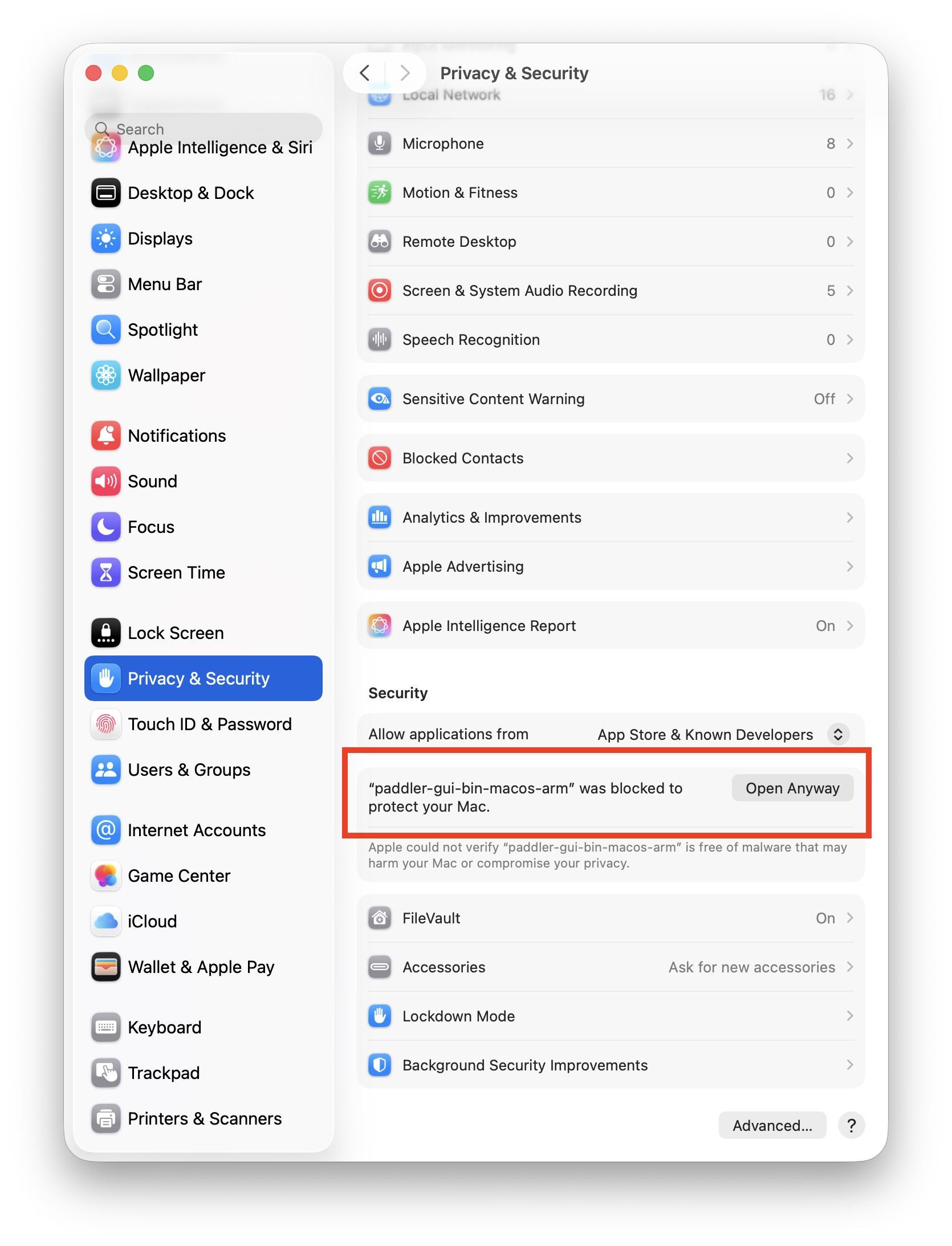
The desktop app should now launch. From this point on, you can open it normally — the warning won't appear again.
As an optional step, you can move the binary to a system directory so it lives in a more permanent location and is available from your PATH. While you're at it, you can rename it to something shorter, for example:
sudo mv ~/Downloads/paddler-gui-bin-macos-arm /usr/local/bin/paddler-gui
You'll be asked for your Mac password.
After this, you can launch the app from any terminal by typing paddler-gui (or whatever other name you provided) from anywhere on your system.
Linux binaries
There are two Linux binaries available, depending on your system's glibc version:
paddler-gui-bin-linux-libc2.35-amd64— for glibc 2.35+ (e.g. Ubuntu 22.04 LTS).paddler-gui-bin-linux-libc2.39-amd64— for glibc 2.39+ (e.g. Ubuntu 24.04 LTS).
If unsure, check your glibc version with ldd --version.
Building from source
If your system isn't supported by the pre-built binaries, or you'd prefer to build the desktop app yourself, you can build the binary from source. To do so:
Clone our repository then build the desktop app from the project root. On macOS and Linux you can use the
make target/release/paddler_guicommand to build the binary.The resulting binary will be at
target/release/paddler_gui.